
Bizzo casino registration: create your account
Starting Bizzo casino registration means opening an account before you can deposit, claim a bonus, or sign in to play. Before you begin, it helps to know who is eligible and what the process actually asks of you, since the screen itself can vary by location. This guide covers age rules, the one-account policy, the on-screen sign-up flow, registration-stage promo codes, and what to do if something goes wrong. For a broader look at what the casino offers beyond account creation, visit our Bizzo casino overview.
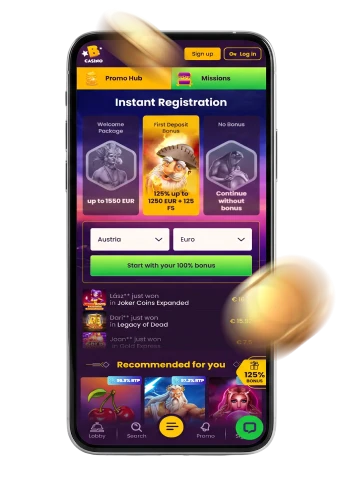
Bizzo casino sign up eligibility
We only accept adult players: the minimum age is 18, and your country of residence may set a higher threshold for online gambling. It’s your responsibility to check the age rules that apply where you live before creating an account; meeting this stated minimum does not by itself confirm that registration or play is available in your location.
Our terms also limit each player to one personal user account. If you already hold an account with us, don’t open a second one — duplicate accounts can lead to termination of the accounts involved and suspension of payouts, and we may decline refunding a deposit once a duplicate is detected. Keep your login to yourself and use a single account for all your activity.
What to do on the registration screen
Where the sign-up option is offered for your location, open it and follow the fields and instructions shown on the current registration screen.
- Open the registration option if it’s offered for your location.
- Complete only the account details requested on screen and follow the displayed terms.
- Review the information you entered before using the form’s submission control.
Read the terms linked from the registration screen before submitting; they set out the conditions that apply to your account.
Promo codes and registration-linked offers
Entering a promo code during registration is a separate step from creating the account itself. The terms say codes can be used once per user, with limited activation and wagering periods once applied. If you’re claiming a Bizzo casino bonus this way, enter the code at the registration stage rather than afterward.
- During registration: enter a promo code at the registration stage; codes can be used once per user, and activation and wagering periods are limited.
- As an existing player: apply a bonus code in the coupon area when making a deposit, then activate the resulting bonus in your profile.
Registration and sign-in are separate steps
Creating your account is only the first step; using it afterwards is a separate task. Once you’ve registered, a later Bizzo casino login is how you return to your account — it doesn’t happen automatically as part of sign-up. Keep your account details secure, since the terms don’t allow sharing access with anyone else, including family members.
If you run into trouble signing in after you’ve already registered, that’s a distinct situation from the registration screen itself. Our dedicated login page covers access and sign-in help in more depth; this page’s focus stays on creating the account rather than troubleshooting an existing one.
When to contact Bizzo support
If something interrupts your registration and following the on-screen instructions doesn’t resolve it, contact our support team via Live Chat and explain the problem you’ve encountered. A clear description — which step you were on and what you saw — helps our team look into it properly.
Live Chat is the contact route we point readers to for this kind of registration problem, and it sits alongside the general account rules and on-screen guidance covered earlier on this page. There’s no need to wait for a scheduled callback or email reply before reaching out this way.
Frequently asked questions
How do I complete Bizzo casino registration?
Follow the fields and instructions shown on the current registration screen.
How old do you need to be to register?
You need to be at least 18 to register, and your place of residence may set a higher age threshold for online gambling. Meeting this age requirement doesn’t by itself confirm that registration or play is legally available where you live.
How can I contact Bizzo if I have a registration problem?
Contact our support team via Live Chat and explain the problem you’ve faced. This is the route to use when the registration screen doesn’t resolve an issue on its own.